# git
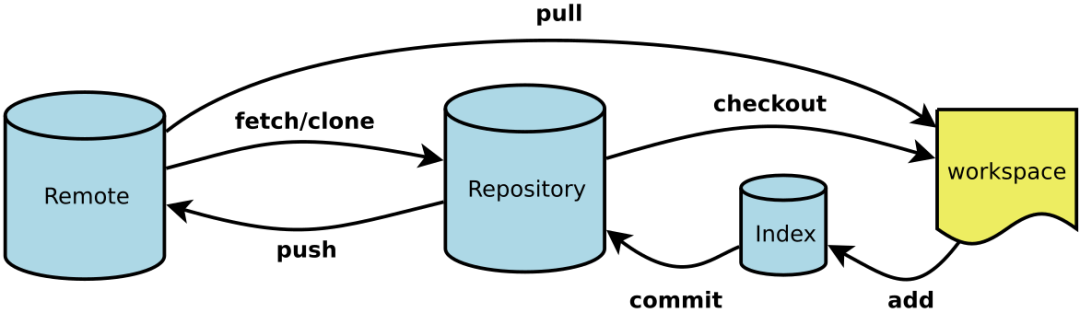
# 名次解释
- Workspace:工作区
- Index / Stage:暂存区
- Repository:仓库区(或本地仓库)
- Remote:远程仓库
# git 常用代理配置
[https]
    proxy = socks5://127.0.0.1:51837
[http]
    proxy = socks5://127.0.0.1:51837

git config --global http.proxy socks5://127.0.0.1:51837
git config --global https.proxy socks5://127.0.0.1:51837

git config --global --unset http.proxy
git config --global --unset https.proxy

git config --global --get http.proxy
git config --global --get https.proxy
1
2
3
4
5
6
7
8
9
10
11
12
13
2
3
4
5
6
7
8
9
10
11
12
13
# 一. 新建代码库
## 在当前目录新建一个Git代码库
$ git init

## 新建一个目录,将其初始化为Git代码库
$ git init [project-name]

## 下载一个项目和它的整个代码历史
$ git clone [url]
1
2
3
4
5
6
7
8
2
3
4
5
6
7
8
# 二.配置
## 显示当前的Git配置
$ git config --list

## 编辑Git配置文件
$ git config -e [--global]

## 设置提交代码时的用户信息
$ git config [--global] user.name "[name]"
$ git config [--global] user.email "[email address]"

## 颜色设置
$ git config --global color.ui true                         # git status等命令自动着色
$ git config --global color.status auto
$ git config --global color.diff auto
$ git config --global color.branch auto
$ git config --global color.interactive auto
$ git config --global --unset http.proxy                    # remove  proxy configuration on git
1
2
3
4
5
6
7
8
9
10
11
12
13
14
15
16
17
2
3
4
5
6
7
8
9
10
11
12
13
14
15
16
17
# 三. 增加/删除文件
## 添加指定文件到暂存区
$ git add [file1] [file2] ...

## 添加指定目录到暂存区,包括子目录
$ git add [dir]

## 添加当前目录的所有文件到暂存区
$ git add .

## 添加每个变化前,都会要求确认
## 对于同一个文件的多处变化,可以实现分次提交
$ git add -p

## 删除工作区文件,并且将这次删除放入暂存区
$ git rm [file1] [file2] ...

## 停止追踪指定文件,但该文件会保留在工作区
$ git rm --cached [file]

## 改名文件,并且将这个改名放入暂存区
$ git mv [file-original] [file-renamed]
1
2
3
4
5
6
7
8
9
10
11
12
13
14
15
16
17
18
19
20
21
2
3
4
5
6
7
8
9
10
11
12
13
14
15
16
17
18
19
20
21
# 四. 代码提交
## 提交暂存区到仓库区
$ git commit -m [message]

## 提交暂存区的指定文件到仓库区
$ git commit [file1] [file2] ... -m [message]

## 提交工作区自上次commit之后的变化,直接到仓库区
$ git commit -a

## 提交时显示所有diff信息
$ git commit -v

## 将add和commit合为一步
$ git commit -am 'message'

## 使用一次新的commit,替代上一次提交
## 如果代码没有任何新变化,则用来改写上一次commit的提交信息
$ git commit --amend -m [message]

## 重做上一次commit,并包括指定文件的新变化
$ git commit --amend [file1] [file2] ...
1
2
3
4
5
6
7
8
9
10
11
12
13
14
15
16
17
18
19
20
21
2
3
4
5
6
7
8
9
10
11
12
13
14
15
16
17
18
19
20
21
# 五. 分支
## 列出所有本地分支
$ git branch

## 列出所有远程分支
$ git branch -r

## 列出所有本地分支和远程分支
$ git branch -a

## 新建一个分支,但依然停留在当前分支
$ git branch [branch-name]

## 新建一个分支,并切换到该分支
$ git checkout -b [branch]

## 新建一个分支,指向指定commit
$ git branch [branch] [commit]

## 新建一个分支,与指定的远程分支建立追踪关系
$ git branch --track [branch] [remote-branch]

## 切换到指定分支,并更新工作区
$ git checkout [branch-name]

## 切换到上一个分支
$ git checkout -

## 建立追踪关系,在现有分支与指定的远程分支之间
$ git branch --set-upstream [branch] [remote-branch]

## 合并指定分支到当前分支
$ git merge [branch]

## 选择一个commit,合并进当前分支
$ git cherry-pick [commit]

## 删除分支
$ git branch -d [branch-name]

## 删除远程分支
$ git push origin --delete [branch-name]
$ git branch -dr [remote/branch]

## 检出版本v2.0
$ git checkout v2.0

## 从远程分支develop创建新本地分支devel并检出
$ git checkout -b devel origin/develop

## 检出head版本的README文件(可用于修改错误回退)
git checkout -- README
1
2
3
4
5
6
7
8
9
10
11
12
13
14
15
16
17
18
19
20
21
22
23
24
25
26
27
28
29
30
31
32
33
34
35
36
37
38
39
40
41
42
43
44
45
46
47
48
49
50
51
2
3
4
5
6
7
8
9
10
11
12
13
14
15
16
17
18
19
20
21
22
23
24
25
26
27
28
29
30
31
32
33
34
35
36
37
38
39
40
41
42
43
44
45
46
47
48
49
50
51
# 六. 标签
## 列出所有tag
$ git tag

## 新建一个tag在当前commit
$ git tag [tag]

## 新建一个tag在指定commit
$ git tag [tag] [commit]

## 删除本地tag
$ git tag -d [tag]

## 删除远程tag
$ git push origin :refs/tags/[tagName]

## 查看tag信息
$ git show [tag]

## 提交指定tag
$ git push [remote] [tag]

## 提交所有tag
$ git push [remote] --tags

## 新建一个分支,指向某个tag
$ git checkout -b [branch] [tag]
1
2
3
4
5
6
7
8
9
10
11
12
13
14
15
16
17
18
19
20
21
22
23
24
25
26
2
3
4
5
6
7
8
9
10
11
12
13
14
15
16
17
18
19
20
21
22
23
24
25
26
# 七. 查看信息
## 显示有变更的文件
$ git status

## 显示当前分支的版本历史
$ git log

## 显示commit历史,以及每次commit发生变更的文件
$ git log --stat

## 搜索提交历史,根据关键词
$ git log -S [keyword]

## 显示某个commit之后的所有变动,每个commit占据一行
$ git log [tag] HEAD --pretty=format:%s

## 显示某个commit之后的所有变动,其"提交说明"必须符合搜索条件
$ git log [tag] HEAD --grep feature

## 显示某个文件的版本历史,包括文件改名
$ git log --follow [file]
$ git whatchanged [file]

## 显示指定文件相关的每一次diff
$ git log -p [file]

## 显示过去5次提交
$ git log -5 --pretty --oneline

## 显示所有提交过的用户,按提交次数排序
$ git shortlog -sn

## 显示指定文件是什么人在什么时间修改过
$ git blame [file]

## 显示暂存区和工作区的差异
$ git diff

## 显示暂存区和上一个commit的差异
$ git diff --cached [file]

## 显示工作区与当前分支最新commit之间的差异
$ git diff HEAD

## 显示两次提交之间的差异
$ git diff [first-branch]...[second-branch]

## 显示今天你写了多少行代码
$ git diff --shortstat "@{0 day ago}"

## 显示某次提交的元数据和内容变化
$ git show [commit]

## 显示某次提交发生变化的文件
$ git show --name-only [commit]

## 显示某次提交时,某个文件的内容
$ git show [commit]:[filename]

## 显示当前分支的最近几次提交
$ git reflog
1
2
3
4
5
6
7
8
9
10
11
12
13
14
15
16
17
18
19
20
21
22
23
24
25
26
27
28
29
30
31
32
33
34
35
36
37
38
39
40
41
42
43
44
45
46
47
48
49
50
51
52
53
54
55
56
57
58
59
60
2
3
4
5
6
7
8
9
10
11
12
13
14
15
16
17
18
19
20
21
22
23
24
25
26
27
28
29
30
31
32
33
34
35
36
37
38
39
40
41
42
43
44
45
46
47
48
49
50
51
52
53
54
55
56
57
58
59
60
# 八. 远程同步
## 下载远程仓库的所有变动
$ git fetch [remote]

## 显示所有远程仓库
$ git remote -v

## 显示某个远程仓库的信息
$ git remote show [remote]

## 增加一个新的远程仓库,并命名
$ git remote add [shortname] [url]

## 取回远程仓库的变化,并与本地分支合并
$ git pull [remote] [branch]

## 上传本地指定分支到远程仓库
$ git push [remote] [branch]

## 强行推送当前分支到远程仓库,即使有冲突
$ git push [remote] --force

## 推送所有分支到远程仓库
$ git push [remote] --all
1
2
3
4
5
6
7
8
9
10
11
12
13
14
15
16
17
18
19
20
21
22
23
2
3
4
5
6
7
8
9
10
11
12
13
14
15
16
17
18
19
20
21
22
23
# 九. 撤销
## 恢复暂存区的指定文件到工作区
$ git checkout [file]

## 恢复某个commit的指定文件到暂存区和工作区
$ git checkout [commit] [file]

## 恢复暂存区的所有文件到工作区
$ git checkout .

## 重置暂存区的指定文件,与上一次commit保持一致,但工作区不变
$ git reset [file]

## 重置暂存区与工作区,与上一次commit保持一致
$ git reset --hard

## 重置当前分支的指针为指定commit,同时重置暂存区,但工作区不变
$ git reset [commit]

## 重置当前分支的HEAD为指定commit,同时重置暂存区和工作区,与指定commit一致
$ git reset --hard [commit]

## 重置当前HEAD为指定commit,但保持暂存区和工作区不变
$ git reset --keep [commit]

## 新建一个commit,用来撤销指定commit
## 后者的所有变化都将被前者抵消,并且应用到当前分支
$ git revert [commit]

## 暂时将未提交的变化移除,稍后再移入
$ git stash
$ git stash pop
1
2
3
4
5
6
7
8
9
10
11
12
13
14
15
16
17
18
19
20
21
22
23
24
25
26
27
28
29
30
31
2
3
4
5
6
7
8
9
10
11
12
13
14
15
16
17
18
19
20
21
22
23
24
25
26
27
28
29
30
31
# 十. 其他
$ git init                                                  # 初始化本地git仓库(创建新仓库)
$ git config --global user.name "xxx"                       # 配置用户名
$ git config --global user.email "xxx@xxx.com"              # 配置邮件
$ git config --global color.ui true                         # git status等命令自动着色
$ git config --global color.status auto
$ git config --global color.diff auto
$ git config --global color.branch auto
$ git config --global color.interactive auto
$ git config --global --unset http.proxy                    # remove  proxy configuration on git
$ git clone git+ssh://git@192.168.53.168/VT.git             # clone远程仓库
$ git status                                                # 查看当前版本状态(是否修改)
$ git add xyz                                               # 添加xyz文件至index
$ git add .                                                 # 增加当前子目录下所有更改过的文件至index
$ git commit -m 'xxx'                                       # 提交
$ git commit --amend -m 'xxx'                               # 合并上一次提交(用于反复修改)
$ git commit -am 'xxx'                                      # 将add和commit合为一步
$ git rm xxx                                                # 删除index中的文件
$ git rm -r *                                               # 递归删除
$ git log                                                   # 显示提交日志
$ git log -1                                                # 显示1行日志 -n为n行
$ git log -5
$ git log --stat                                            # 显示提交日志及相关变动文件
$ git log -p -m
$ git show dfb02e6e4f2f7b573337763e5c0013802e392818         # 显示某个提交的详细内容
$ git show dfb02                                            # 可只用commitid的前几位
$ git show HEAD                                             # 显示HEAD提交日志
$ git show HEAD^                                            # 显示HEAD的父(上一个版本)的提交日志 ^^为上两个版本 ^5为上5个版本
$ git tag                                                   # 显示已存在的tag
$ git tag -a v2.0 -m 'xxx'                                  # 增加v2.0的tag
$ git show v2.0                                             # 显示v2.0的日志及详细内容
$ git log v2.0                                              # 显示v2.0的日志
$ git diff                                                  # 显示所有未添加至index的变更
$ git diff --cached                                         # 显示所有已添加index但还未commit的变更
$ git diff HEAD^                                            # 比较与上一个版本的差异
$ git diff HEAD -- ./lib                                    # 比较与HEAD版本lib目录的差异
$ git diff origin/master..master                            # 比较远程分支master上有本地分支master上没有的
$ git diff origin/master..master --stat                     # 只显示差异的文件,不显示具体内容
$ git remote add origin git+ssh://git@192.168.53.168/VT.git # 增加远程定义(用于push/pull/fetch)
$ git branch                                                # 显示本地分支
$ git branch --contains 50089                               # 显示包含提交50089的分支
$ git branch -a                                             # 显示所有分支
$ git branch -r                                             # 显示所有原创分支
$ git branch --merged                                       # 显示所有已合并到当前分支的分支
$ git branch --no-merged                                    # 显示所有未合并到当前分支的分支
$ git branch -m master master_copy                          # 本地分支改名
$ git checkout -b master_copy                               # 从当前分支创建新分支master_copy并检出
$ git checkout -b master master_copy                        # 上面的完整版
$ git checkout features/performance                         # 检出已存在的features/performance分支
$ git checkout --track hotfixes/BJVEP933                    # 检出远程分支hotfixes/BJVEP933并创建本地跟踪分支
$ git checkout v2.0                                         # 检出版本v2.0
$ git checkout -b devel origin/develop                      # 从远程分支develop创建新本地分支devel并检出
$ git checkout -- README                                    # 检出head版本的README文件(可用于修改错误回退)
$ git merge origin/master                                   # 合并远程master分支至当前分支
$ git cherry-pick ff44785404a8e                             # 合并提交ff44785404a8e的修改
$ git push origin master                                    # 将当前分支push到远程master分支
$ git push origin :hotfixes/BJVEP933                        # 删除远程仓库的hotfixes/BJVEP933分支
$ git push --tags                                           # 把所有tag推送到远程仓库
$ git fetch                                                 # 获取所有远程分支(不更新本地分支,另需merge)
$ git fetch --prune                                         # 获取所有原创分支并清除服务器上已删掉的分支
$ git pull origin master                                    # 获取远程分支master并merge到当前分支
$ git mv README README2                                     # 重命名文件README为README2
$ git reset --hard HEAD                                     # 将当前版本重置为HEAD(通常用于merge失败回退)
$ git rebase
$ git branch -d hotfixes/BJVEP933                           # 删除分支hotfixes/BJVEP933(本分支修改已合并到其他分支)
$ git branch -D hotfixes/BJVEP933                           # 强制删除分支hotfixes/BJVEP933
$ git ls-files                                              # 列出git index包含的文件
$ git show-branch                                           # 图示当前分支历史
$ git show-branch --all                                     # 图示所有分支历史
$ git whatchanged                                           # 显示提交历史对应的文件修改
$ git revert dfb02e6e4f2f7b573337763e5c0013802e392818       # 撤销提交dfb02e6e4f2f7b573337763e5c0013802e392818
$ git ls-tree HEAD                                          # 内部命令:显示某个git对象
$ git rev-parse v2.0                                        # 内部命令:显示某个ref对于的SHA1 HASH
$ git reflog                                                # 显示所有提交,包括孤立节点
$ git show HEAD@{5}
$ git show master@{yesterday}                               # 显示master分支昨天的状态
$ git log --pretty=format:'%h %s' --graph                   # 图示提交日志
$ git show HEAD~3
$ git show -s --pretty=raw 2be7fcb476
$ git stash                                                 # 暂存当前修改,将所有至为HEAD状态
$ git stash list                                            # 查看所有暂存
$ git stash show -p stash@{0}                               # 参考第一次暂存
$ git stash apply stash@{0}                                 # 应用第一次暂存
$ git grep "delete from"                                    # 文件中搜索文本“delete from”
$ git grep -e '#define' --and -e SORT_DIRENT
$ git gc
$ git fsck
## 生成一个可供发布的压缩包
$ git archive
1
2
3
4
5
6
7
8
9
10
11
12
13
14
15
16
17
18
19
20
21
22
23
24
25
26
27
28
29
30
31
32
33
34
35
36
37
38
39
40
41
42
43
44
45
46
47
48
49
50
51
52
53
54
55
56
57
58
59
60
61
62
63
64
65
66
67
68
69
70
71
72
73
74
75
76
77
78
79
80
81
82
83
84
85
86
87
88
2
3
4
5
6
7
8
9
10
11
12
13
14
15
16
17
18
19
20
21
22
23
24
25
26
27
28
29
30
31
32
33
34
35
36
37
38
39
40
41
42
43
44
45
46
47
48
49
50
51
52
53
54
55
56
57
58
59
60
61
62
63
64
65
66
67
68
69
70
71
72
73
74
75
76
77
78
79
80
81
82
83
84
85
86
87
88
← 杂货铺