# 安装

# 下载
因为本地使用的是scala-2.13.2,所以下载 kafka_2.13-2.7.0.tgz (opens new window)
# 安装
# 1. 安装 zookeeper
# 2. 安装 kafka
# 2.1 复制 安装包到 /usr/local/soft,解压
$ cp kafka_2.13-2.7.0.tgz /usr/local/soft
$ cd /usr/local/soft
$ tar -xzvf kafka_2.13-2.7.0.tgz
1
2
3
2
3
# 2.2 修改配置文件
$ cd /usr/local/soft/kafka_2.13-2.7.0/config
$ vim server.properties
1
2
2
## broker 的全局唯一编号,不能重复
broker.id=1

## 删除 topic 功能使能
delete.topic.enable=true

log.dirs=/mnt/data/kafka/data

## Zookeeper 集群地址
zookeeper.connect=big002:2181,big003:2181,big004:2181
1
2
3
4
5
6
7
8
9
10
2
3
4
5
6
7
8
9
10
## 创建 /mnt/data/kafka/data目录
$ mkdir -p /mnt/data/kafka/data
1
2
2
# 2.3 同步到其他主机 big003、big004
$ xsync kafka_2.13-2.7.0
1
# 2.4 修改 big003、big004主机中的配置
## big003
broker.id=2

## big004
broker.id=3
1
2
3
4
5
2
3
4
5
# 2.5 启动
# 2.5.1 启动 zookeeper
在 big002 big003 big004 上分别执行
$ /usr/local/soft/zookeeper/bin/zkServer.sh start
1
# 2.5.2 启动 kafka
在 big002 big003 big004 上分别执行
$ /usr/local/soft/kafka_2.13-2.7.0/bin/kafka-server-start.sh -daemon /usr/local/soft/kafka_2.13-2.7.0/config/server.properties
1
# 2.6 测试
# 2.6.1 查看 topic 列表
$ /usr/local/soft/kafka_2.13-2.7.0/bin/kafka-topics.sh --zookeeper big002:2181 --list
1
# 2.6.2 新建 topic
新建 topic,名称是 myTopic,副本数=3,分区数=1
$ /usr/local/soft/kafka_2.13-2.7.0/bin/kafka-topics.sh --zookeeper big002:2181 --create --replication-factor 1 --partitions 1 --topic myTopic
1
# 2.6.3 删除 topic
需要 server.properties 中设置 delete.topic.enable=true 否则只是标记删除。
$ /usr/local/soft/kafka_2.13-2.7.0/bin/kafka-topics.sh --zookeeper big002:2181 --delete --topic myTopic

Topic myTopic is marked for deletion.
Note: This will have no impact if delete.topic.enable is not set to true.
1
2
3
4
2
3
4
# 2.6.4 查看某个 Topic 的详情
$ /usr/local/soft/kafka_2.13-2.7.0/bin/kafka-topics.sh --zookeeper big002:2181 --describe --topic myTopic
Topic: myTopic	PartitionCount: 1	ReplicationFactor: 3	Configs:
	Topic: myTopic	Partition: 0	Leader: 2	Replicas: 2,3,1	Isr: 2,3,1
1
2
3
2
3
# 2.6.5 修改分区数
$ /usr/local/soft/kafka_2.13-2.7.0/bin/kafka-topics.sh --zookeeper big002:2181 --alter --topic myTopic --partitions 6

$ /usr/local/soft/kafka_2.13-2.7.0/bin/kafka-topics.sh --zookeeper big002:2181 --describe --topic myTopic
Topic: myTopic	PartitionCount: 6	ReplicationFactor: 3	Configs:
	Topic: myTopic	Partition: 0	Leader: 2	Replicas: 2,3,1	Isr: 2,3,1
	Topic: myTopic	Partition: 1	Leader: 3	Replicas: 3,2,1	Isr: 3,2,1
	Topic: myTopic	Partition: 2	Leader: 1	Replicas: 1,3,2	Isr: 1,3,2
	Topic: myTopic	Partition: 3	Leader: 2	Replicas: 2,3,1	Isr: 2,3,1
	Topic: myTopic	Partition: 4	Leader: 3	Replicas: 3,1,2	Isr: 3,1,2
	Topic: myTopic	Partition: 5	Leader: 1	Replicas: 1,2,3	Isr: 1,2,3
1
2
3
4
5
6
7
8
9
10
2
3
4
5
6
7
8
9
10
# 2.7 收发消息
## 消费消息
$ /usr/local/soft/kafka_2.13-2.7.0/bin/kafka-console-consumer.sh --topic myTopic --from-beginning --bootstrap-server big002:9092

## 发送消息
$ /usr/local/soft/kafka_2.13-2.7.0/bin/kafka-console-producer.sh --topic myTopic --bootstrap-server big002:9092
1
2
3
4
5
2
3
4
5
# 群起脚本
#!/bin/bash

case $1 in
"start"){
    echo "========================= starting kafka  ========================="
    for i in big002 big003 big004
    do
        ssh $i /usr/local/soft/kafka_2.13-2.7.0/bin/kafka-server-start.sh -daemon /usr/local/soft/kafka_2.13-2.7.0/config/server.properties
        echo "========================= $i kafka start success ========================="
    done
};;

"stop"){
    echo "========================= stoping kafka  ========================="
    for i in big002 big003 big004
    do
        ssh $i /usr/local/soft/kafka_2.13-2.7.0/bin/kafka-server-stop.sh
        echo "========================= $i kafka stop success ========================="
    done
};;

esac
1
2
3
4
5
6
7
8
9
10
11
12
13
14
15
16
17
18
19
20
21
22
2
3
4
5
6
7
8
9
10
11
12
13
14
15
16
17
18
19
20
21
22
# 采坑记录
对于 kafka 的 zookeeper 集群地址配置:
## Zookeeper 集群地址
zookeeper.connect=big002:2181,big003:2181,big004:2181
1
2
2
上面的还有一种写法:
## Zookeeper 集群地址
zookeeper.connect=big002:2181,big003:2181,big004:2181/kafka
1
2
2
注意后面多带了一个/kafka,这种配置的意思是 kafka 在 zookeeper 的所有配置都放在 /kafka 节点下,如下图所示:
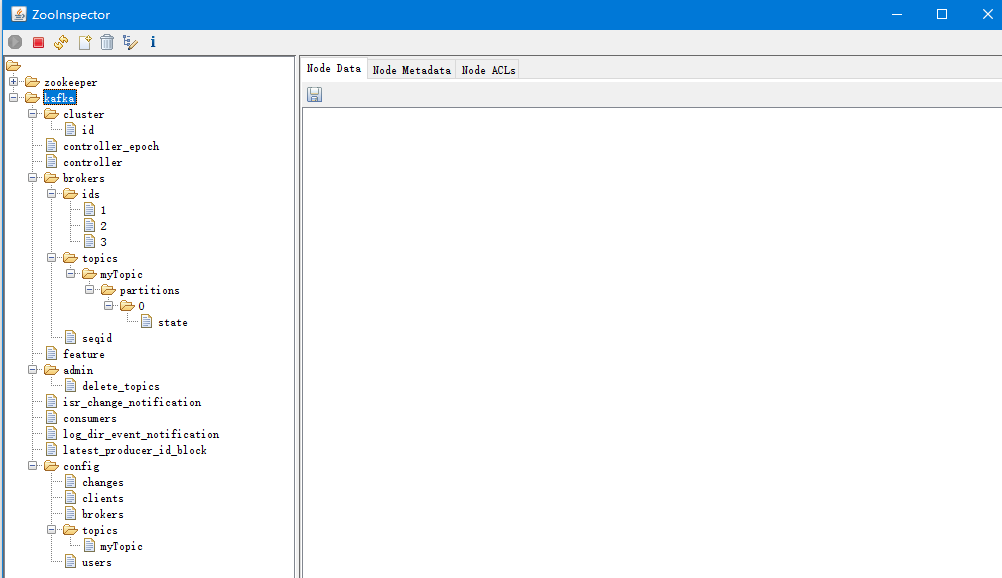
一旦采用这种写法之后,所有的控制台命令凡是用到 zookeeper 地址的地方都要加上 /kafka,如:
# 查看 topic 列表
$ bin/kafka-topics.sh --zookeeper big002:2181/kafka --list
# 新建 topic:名称是 myTopic,副本数=3,分区数=1
$ bin/kafka-topics.sh --zookeeper big002:2181/kafka --create --replication-factor 1 --partitions 1 --topic myTopic
1
2
3
4
2
3
4
如果安装了 Kafka Eagle 监控工具,它的 zookeeper 配置也要加上 /kafka。如下:
# /usr/local/soft/kafka-eagle-web-2.0.5/conf/system-config.properties
kafka.eagle.zk.cluster.alias=cluster1
cluster1.zk.list=big002:2181,big003:2181,big004:2181/kafka
1
2
3
2
3